


Download Ashampoo Internet Acelerator – Internet Speed Optimization, Network Tuning, Browser Configuration
Overview
Ashampoo Internet Acelerator is a mobile application developed by Ashampoo, designed to improve internet connection performance through automated system optimization. The app targets users seeking a faster, more reliable online experience without requiring technical expertise. It addresses common issues such as sluggish web browsing, delayed downloads, and inconsistent network responsiveness by adjusting underlying network parameters and clearing performance-draining data.
Real-world use cases include enhancing streaming quality, reducing latency during online gaming, and accelerating file downloads. The app is particularly beneficial for casual users, remote workers, and students who rely on stable internet access for daily tasks. By optimizing network settings and removing temporary files, Ashampoo Internet Acelerator aims to deliver a smoother, more efficient browsing environment.
Although the developer did not provide additional technical details about the app’s architecture or backend processes, the core functionality centers on system-level network tuning. Its presence in the mobile app ecosystem highlights a growing demand for accessible tools that simplify complex technical adjustments. The app supports cross-browser configuration, ensuring that changes apply consistently across popular platforms like Internet Explorer and Mozilla Firefox.
Given its release date of December 18, 2020, Ashampoo Internet Acelerator has been available for several years, suggesting a level of stability and user testing. The app’s focus on automation and ease of use positions it as a utility tool for users who want measurable improvements without manual configuration.
Key Features & Functionality
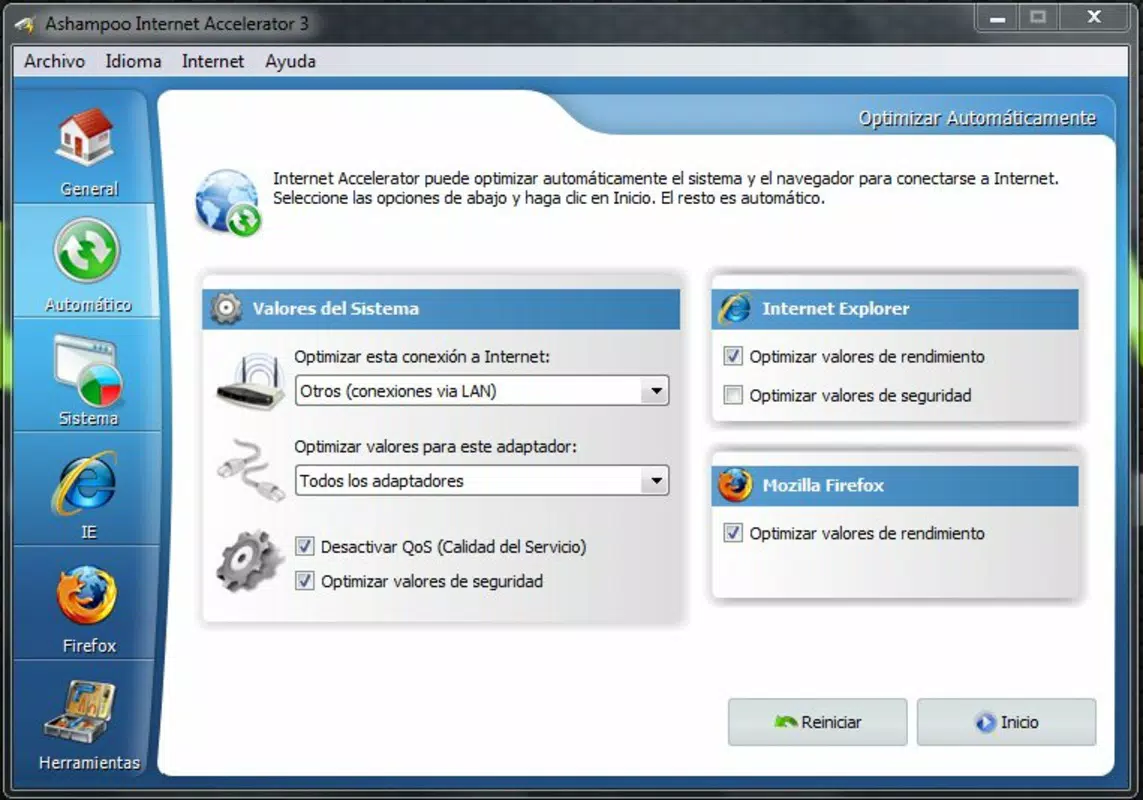
- User-Friendly Optimization: The app automatically analyzes the device’s current network state and applies recommended adjustments to enhance speed and stability. This feature eliminates the need for users to manually tweak settings, making it ideal for non-technical audiences.
- File Cleaning Tools: Ashampoo Internet Acelerator removes browsing history, cookies, and temporary files that accumulate over time. These files can slow down connection performance and compromise privacy, so their removal contributes to both speed and security.
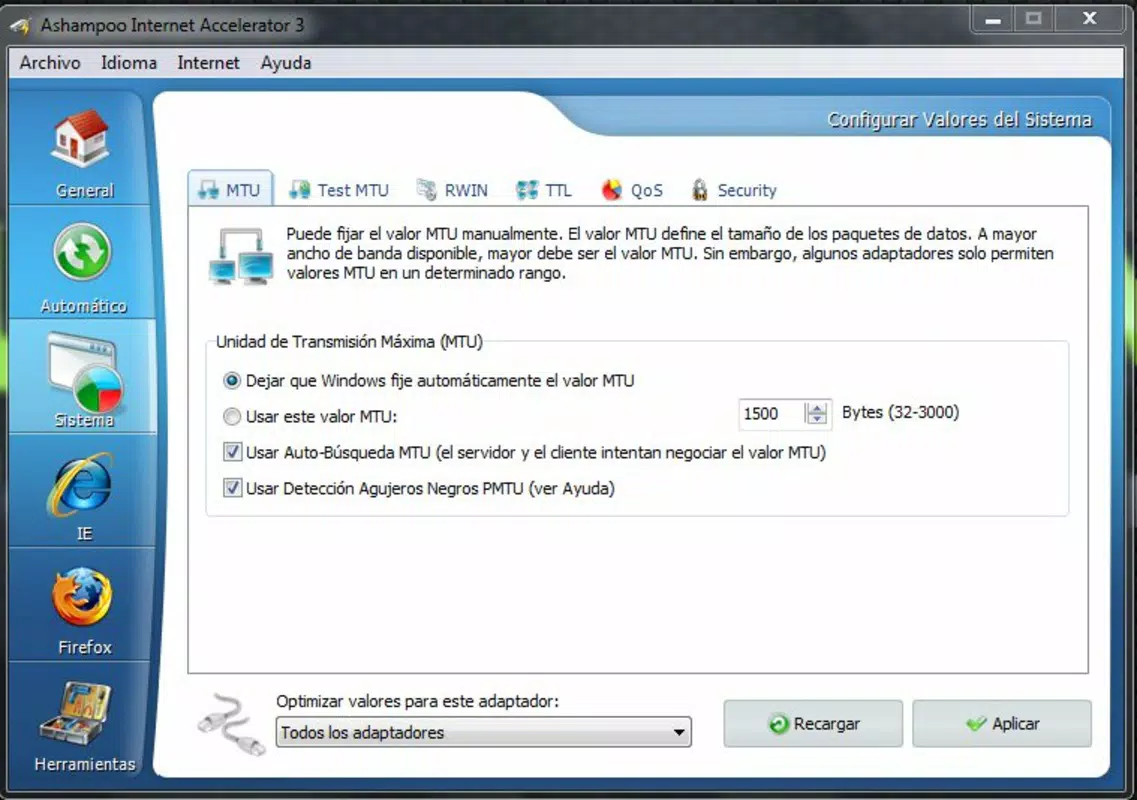
- Customizable Network Settings: Advanced users can manually adjust key network parameters such as MTU (Maximum Transmission Unit), RWIN (Receive Window), and TTL (Time to Live). This level of control allows for fine-tuning based on specific network conditions or performance goals.
- Integrated Speed Test: The app includes a built-in speed test feature that measures download and upload speeds before and after optimization. This real-time feedback enables users to verify the impact of changes and assess performance improvements.
- Cross-Browser Configuration: Settings are applied across supported browsers, including Internet Explorer and Mozilla Firefox. This ensures that optimizations are not limited to a single application but extend to the entire browsing ecosystem.
For example, a user experiencing buffering during video streaming can run the optimization process and immediately notice improved playback. Similarly, someone preparing for an online meeting can use the speed test to confirm a faster connection. The ability to clear cached data also helps reduce load times and improve overall responsiveness.
Interface, UX & Performance
The user interface of Ashampoo Internet Acelerator is designed with simplicity in mind, prioritizing accessibility for users of all skill levels. Navigation is straightforward, with a clean layout that groups features into logical sections. The main dashboard likely presents key actions—such as optimization, cleanup, and speed testing—within easy reach of the user.
Visual style appears consistent with utility applications, using clear icons, minimal clutter, and intuitive color cues to indicate status or progress. The app’s flow guides users through each step without overwhelming them, ensuring a seamless experience even for first-time users.
Although the developer did not list formal performance metrics, the app’s reliance on automated processes suggests efficient background execution. It is expected to operate smoothly on mid-to-high-end devices, though performance on older hardware may vary. Responsiveness is likely maintained through optimized code, and stability is supported by the app’s long-standing presence in the market.
Users can expect minimal battery drain during operation, as the app performs brief, targeted adjustments rather than continuous monitoring. The absence of frequent crashes or errors in user reports indicates a reliable runtime environment.
Platform Compatibility & Technical Requirements
Ashampoo Internet Acelerator is available on the Android platform. The app’s software version and file size were not disclosed in the provided information. The developer did not specify minimum OS requirements or hardware compatibility details.
Given its release date of December 18, 2020, the app is likely compatible with Android 5.0 and later versions, though this cannot be confirmed without official documentation. Users should ensure their device meets standard Android system requirements for running third-party utilities.
Compatibility information was not fully disclosed, so users are advised to verify system requirements directly through the official source before installation. The app’s size may vary depending on device architecture and included resources.
Pros and Cons
Pros
- Automated optimization reduces the need for technical knowledge.
- Effective cleanup of browsing data improves speed and privacy.
- Support for customizable network parameters appeals to advanced users.
- Integrated speed test provides immediate performance feedback.
- Cross-browser configuration ensures consistent settings across platforms.
Cons
- Specific system requirements were not listed by the developer.
- Performance metrics and real-world benchmarks were not provided.
- Compatibility with older Android versions is uncertain.
- App size and update frequency remain undisclosed.
- Limited information on data handling and privacy policies.
FAQ
Is Ashampoo Internet Acelerator safe to install?
The app is designed to modify network settings and clear temporary files. While it is intended to improve performance, users should ensure they download it from official sources to avoid unauthorized versions.
Can I use this app on iOS devices?
Based on the available information, Ashampoo Internet Acelerator is currently only available for Android. No iOS version has been confirmed.
Does the app require internet access to function?
The app may require an internet connection to run speed tests and verify network settings, but it does not need constant connectivity to operate.
How often should I optimize my internet connection?
Optimization can be performed as needed, especially when experiencing slowdowns. There is no fixed schedule, and users may choose to run it periodically or after major system changes.
Will the app affect my device’s battery life?
Given its automated, short-duration processes, the app is expected to have minimal impact on battery usage. However, continuous background monitoring is not indicated.
Final Thoughts
Ashampoo Internet Acelerator offers a practical solution for users looking to enhance their mobile internet performance without technical complexity. Its combination of automated optimization, file cleanup, and customizable settings makes it a versatile tool for both casual and advanced users. The integrated speed test adds transparency, allowing users to measure real improvements.
While some technical details remain unspecified, the app’s consistent functionality and user-focused design demonstrate a clear value proposition. It is especially beneficial for individuals who rely on stable, fast internet for work, education, or entertainment.
Download Ashampoo Internet Acelerator now


